
Hello Kickstarter backers!
We’re happy to be sending you the updated ebook of Master Expert. Instructions are below for Kindle users.
If you use use other ebook readers like Apple iBooks or Nook, please email us at programs@expertunity.global and we’ll arrange an alternate method of delivery.
How to send Master Expert to your Kindle library
We can send your ebook directly to your Kindle library once you approve our delivery email address, programs@expertunity.global.
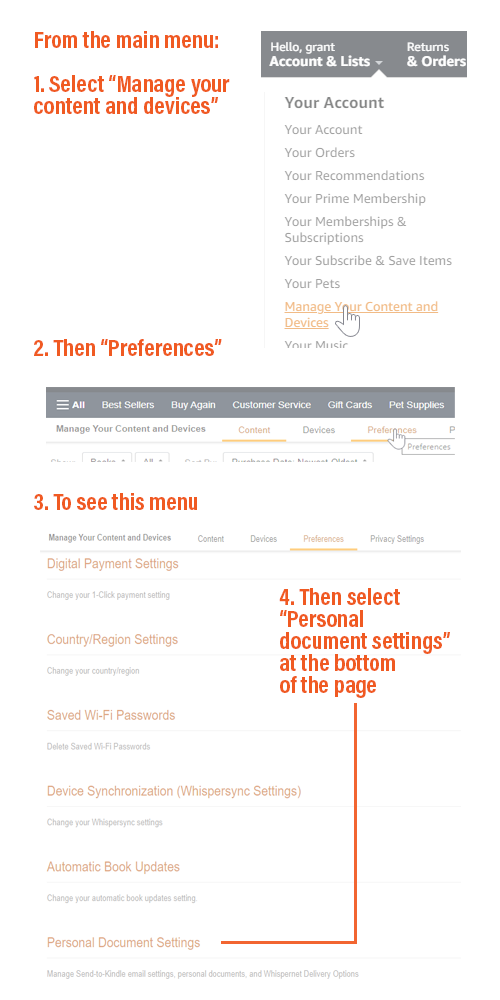
You can set this up via the “content and devices” menu on the Amazon website.
Click here for direct links to that page on Amazon in your country AU | CA | DE | FR | UK | US(The URL always seems to be local Amazon site + /hz/mycd/myx#/home/settings/payment, for instance https://amazon.com.br/hz/mycd/myx#/home/settings/payment). Or click here to see how to get to the preferences screen from the main Amazon menu
Steps
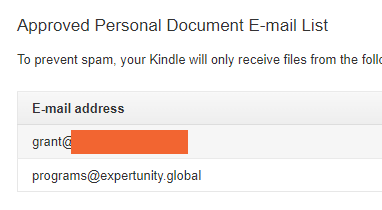
There’s two steps to approve our email to send the book: first let us know your the email address of your Kindle library, and second, approve our email to send files to the library.
1 At the bottom of the Content and Devices screen is the Approved Personal Document Email List. Add programs@expertunity.global.
2 Just above that is Send to Kindle email Settings, which will show an email like yourname_fW002Aq@kindle.com.
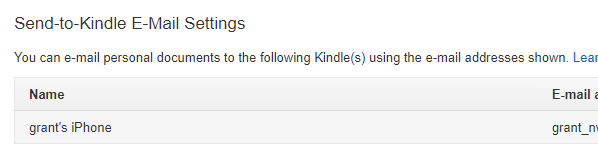
Once you know your Kindle email, and have approved our email, send your Kindle email to programs@expertunity.global and we’ll mail the book back.
One more thing…
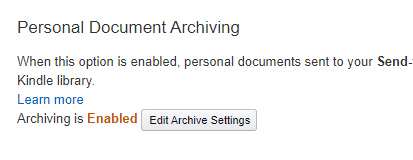
As an additional step, we suggest also enabling Personal Document Archiving, as this means that any file sent to one of your Kindle readers will be available on all of them.
Questions?
Any questions, please mail programs@expertunity.global.
Thank you.


